
Cook from your pantry
Which recipes work with what is in the cupboard? MealCrew compares your pantry with your recipes and the MealCrew recipes – no AI needed.
Lentils, onions and bacon in the fridge – what can you make without going shopping? Cook from your pantry answers that with one tap. MealCrew compares your pantry with your recipes and the recipes from MealCrew. No AI is involved, and nothing leaves MealCrew.
With MealCrew Plus. Without Plus, the button shows what Plus includes.
How it works
- Open Recipes and tap the fridge → pot icon to the left of the magic wand.
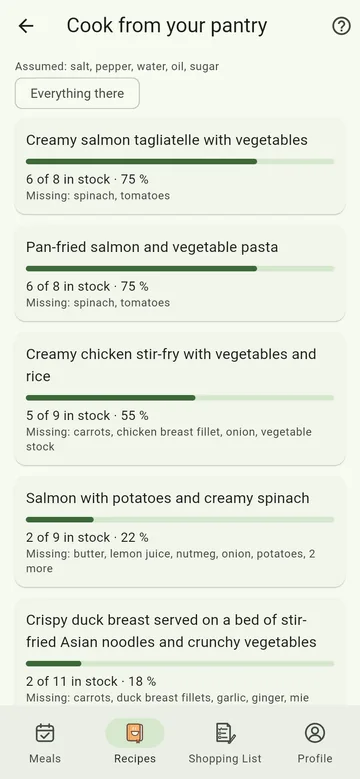
- MealCrew shows the recipes for which something is already in stock – best first. For each recipe you see a bar and e.g. 7 of 9 in stock · 78 %, and below it what is missing.
- At the top you filter: All or only Own recipes, and by course – Main (soups, salads and bakes included), Starter, Dessert or Other. Everything there shows only the recipes you can cook right away. Your device remembers the filters.
- One tap opens the recipe. MealCrew recipes that aren't in your collection yet (marked MealCrew) are added to it on the way.
What counts
- Which recipes: your own, those shared with your crew, and the MealCrew recipes.
- Stock: what is in the crew's pantry with an amount above 0. Items marked All gone don't count.
- Similar names match: "Spanish onions" in the pantry count for "onion" in the recipe.
- Basics – salt, pepper, water, oil and sugar – are assumed. They count neither as in stock nor as missing; the Assumed line at the top names them.
- Amounts are not compared: whether 200 g or 500 g of lentils are in the cupboard, the check doesn't look – only whether there are any.
Only a little missing? Open the recipe and put the ingredients on the shopping list with the shopping cart.