
Suggest meals
Plan lunch and dinner for the next few days at the push of a button – matching your crew's diets and your pantry, without the same dish over and over.
No idea what to cook this week? Suggest meals fills the free lunches and dinners of the next few days with recipes. You look through the suggestions, swap what doesn't fit and plan the rest with one tap.
With MealCrew Plus. Without Plus, the button shows what Plus includes.
How it works
- In Meals, tap the calendar with a tick at the top – it is there in month, week, day and list.
- Choose when to start (today, tomorrow, next Monday or a date) and how many days (2 to 7). Below, MealCrew shows how many meals are still free in that period.
- Choose lunch and/or dinner, a maximum preparation time (or “any”), the traffic light (all, no red or green only), the diets and who is eating.
-
With Use the pantry, dishes come first for which a lot is already in the pantry.

-
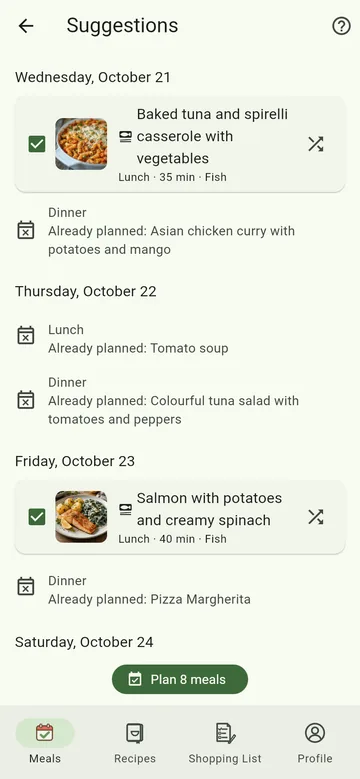
Tap Suggest. MealCrew shows one recipe per day and meal.
- Don't like a suggestion? Tap Something else – or untick it and get new ones for everything unticked with Suggest new for unticked.
- Plan meals adds everything ticked to the calendar, with ingredients and portions for everyone eating.
Then fetch the ingredients on the shopping list with From meals.
What counts
- Free slots: If something is already planned for a lunch or dinner, MealCrew suggests nothing for it.
- Which recipes: your own, those shared with your crew and the MealCrew recipes. Main courses, soups, salads and bakes count – no desserts or starters. MealCrew recipes are added to your collection when you plan them.
- Traffic light: MealCrew recipes are rated green, yellow or red – green: lots of vegetables or pulses and rather light; red: e.g. deep-fried, with sausage or bacon, very high in calories or sweet baking. Your own recipes carry the rating you set in the recipe. With no red, recipes without a rating stay in; with green only, they do not. The rating is a rough guide, not dietary advice. You can filter the recipe list by it too (Filter → Traffic light, or right above the recipes in “From MealCrew”).
- Diets: Preselected is what suits everyone eating. If you pick a diet that doesn't suit someone, a note appears – you can still plan.
- Variety: What was cooked in the last four weeks moves to the back; the same dish appears only once in the period.